Qibla Lens: A Calm Companion for Qibla and Prayer

Picture this: you are in a hotel room in a city you are visiting for the first time, a new office, or a busy airport lounge. It is time to pray, so you take out your phone to find the Qibla. You open a familiar app and are greeted by a crowded screen, a small arrow spinning on a flat surface that looks nothing like the room around you. You tilt the phone left and right, wondering: is the Qibla toward the window, or that corner?
At the moment you were meant to enter a calm state before prayer, the phone steals your focus. That is exactly where the idea of Qibla Lens began — not to be another religious app, but to reset the relationship between technology and daily worship under one idea: a companion toward serenity.
What Is Qibla Lens?
Qibla Lens is a mobile app that brings a Muslim's daily tools into one quiet interface: finding the Qibla through the camera, prayer times and reminders, the Hijri calendar, and daily verses, hadith, and adhkar. It offers both Arabic and English interfaces, with a palette of deep navy, soft gold, and warm ivory instead of loud colors and crowded screens.
The point is not to add more buttons. It is to shorten the path to what you actually need before prayer and through the day.
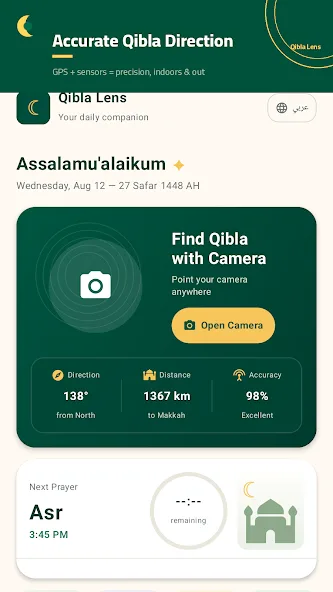
1. Camera Qibla: direction over reality
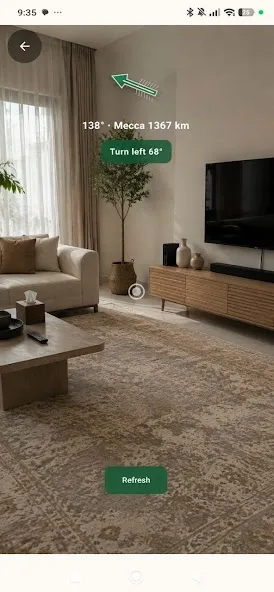
Instead of a flat compass that asks you to project a bearing onto the walls of a room, Qibla Lens opens the camera and draws the Qibla indicator over the live view. Raise the phone, see what is in front of you, and the arrow appears directly on top of it. Whether you are in a hotel room, an airport, an office, or a new city, the direction becomes part of the scene you are already looking at.
If the camera is not convenient, you can switch to the classic compass mode. The app uses your location to calculate the Qibla bearing, applies magnetic declination correction, and offers calibration guidance when the compass needs it.
“The Qibla is no longer a confusing arrow on a flat map; it is a clear destination you can see through your phone's lens, right where you are standing.”
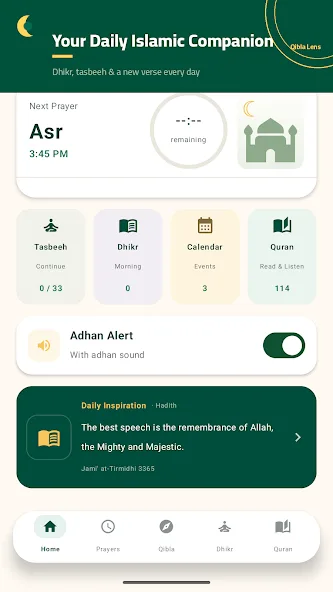
2. Prayer times: the rhythm of the day at a glance
You should not have to dig through complicated menus to know how long is left before the next prayer. The home screen is designed to be your time compass:
- Next prayer card: the upcoming prayer with a live countdown.
- Day progress bar: a quiet visual indicator of where you are between the five prayers.
- Adhan reminders: a reminder at prayer time, with control over notifications based on your location.
- Hijri calendar: Islamic dates in the same place.
Open the app for a few seconds and you know where you stand in your day, ready for the next prayer without distraction.
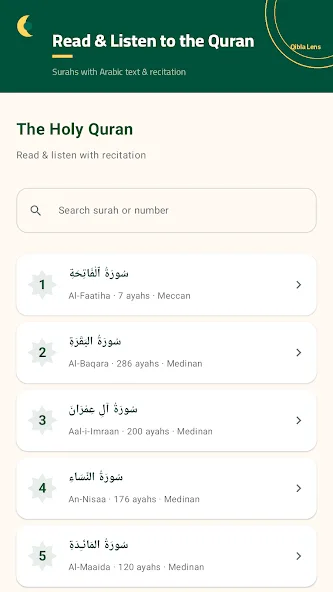
3. Quran and listening in one place
Many users install one app for prayer times, another for Qibla, a third for the Quran, and a fourth for recitations. Qibla Lens brings Quran reading and listening into the same space, with recitations from voices many Muslims know, including Sheikh Mishary Alafasy, Sheikh Abdulrahman Al-Sudais, and Sheikh Maher Al-Muaiqly.
Whether you are on your way to work or reviewing your daily portion before sleep, the Quran and the recitation are in the same place instead of scattered across multiple apps.
4. Dhikr as a daily habit
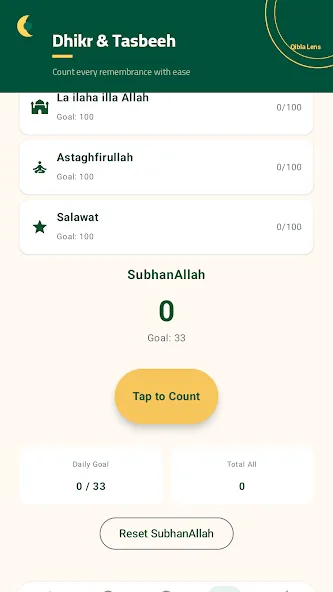
A Muslim does not need only a tasbeeh counter; they need something that encourages consistency. Qibla Lens includes a digital tasbeeh and dhikr counter that lets you set a daily goal and follow your progress step by step, so remembrance becomes a small, steady habit that survives a busy day.
The goal is not to compete for the highest number. It is to help you stay on the path.
5. A design made for calm
The first thing you notice about Qibla Lens is that it does not shout for your attention. Its visual identity is inspired by quiet and reverence:
- A palette of deep navy, soft gold, and warm ivory.
- Subtle Islamic geometric details that respect white space.
- A complete Arabic and English interface, one tap away.
- Focus on the essential content instead of elements that pull your attention away.
Good design in a worship app is not measured by how many elements it contains, but by how well it disappears when worship begins. That is the standard Qibla Lens tries to approach.
The difference at a glance
| Experience | Cluttered apps | Qibla Lens |
|---|---|---|
| Finding the Qibla | A flat compass that leaves you guessing the direction in the room | Direct camera guidance over reality, plus a compass mode |
| Interface | Clashing colors and too many elements | A calm identity (navy, gold, ivory) that is easy on the eye |
| Following the day | Dry text tables for prayer times | A next-prayer card, countdown, and day progress bar |
| Tool integration | Three or four separate apps | Qibla, prayer times, Quran and listening, and dhikr goals |
| Language | A single language or an inconsistent translation | A complete Arabic and English experience |
Who is Qibla Lens for?
For the traveler who arrives in a new hotel and does not know which wall to face; for the new Muslim who wants a clear, welcoming app; and for anyone looking for a quiet space that brings the Qibla, prayer times, and daily worship together without jumping between four apps. It is also for anyone who prefers to see the Qibla over reality instead of translating a number on a screen into a direction in the room.
Try Qibla Lens for yourself
Good technology serves you quietly, then steps aside so you can have your moment. Qibla Lens is designed to be that calm companion in your pocket: it keeps your time, guides you to the Qibla through the camera, and brings your daily portion of worship closer without noise.
Download Qibla Lens on Google Play
If you would like to try Adwatak's free browser tools as well, you can open the Qibla camera or prayer times directly, with no installation.
Frequently Asked Questions
How does Qibla Lens find the Qibla through the camera?
The app opens the rear camera and draws the Qibla arrow over the live view. The direction is calculated from your location and the phone's sensors, with magnetic declination correction, and you can switch to compass mode if the camera is not convenient.
Does Qibla Lens work in any city?
Yes. The app calculates the Qibla bearing from your location and can be used in any city, country, or time zone. Enable location or update it when you move to a new place.
What else does Qibla Lens offer besides the Qibla?
It brings together prayer times, adhan reminders, the Hijri calendar, daily verses, hadith and adhkar, plus a space for Quran reading and listening and a digital tasbeeh with daily goals.
Is Qibla Lens available in Arabic and English?
Yes. You can switch between Arabic and English inside the app with one tap.
Who is Qibla Lens for?
For travelers, new Muslims, and anyone who wants a calm app that brings the Qibla, prayer times, and daily worship together in one place.
This article is an introduction to Qibla Lens. The download link goes to the app's official Google Play page. No ratings or unverified download figures are included.